The Event Loop in JavaScript
Single-Threaded Nature and Call Stack
JavaScript is a single-threaded programming language, meaning it can only execute one task at a time. Visualize JavaScript as a diligent worker following a single line of tasks. Each task is completed before moving on to the next. This single line, known as the call stack, represents the ongoing task in JavaScript.
Here's a basic diagram illustrating the JavaScript runtime components, including the heap and stack:
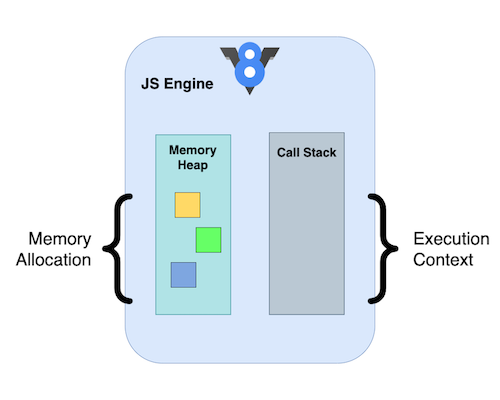
Heap: Memory allocation takes place in the heap. It dynamically allocates memory for objects and data structures used in your code.
Stack (Call Stack): The stack keeps track of function calls in your code. Whenever a function is invoked, a new frame is added to the stack, representing the function's execution context. When a function finishes execution, its frame is removed from the stack, allowing the next function to proceed.
In essence, the heap manages memory, while the stack governs the flow of execution through function calls.
How the Call Stack Works
To understand the event loop, you first need to grasp the call stack. It acts as JavaScript's "to-do list," recording each function call.
function multiply(a, b) {
  return a * b;
}

function square(n) {
  return multiply(n, n);
}

square(2);
Stack execution order (top of the stack is the currently executing frame):
push   main()
push   square(2)
push   multiply(2, 2)
pop    multiply  → returns 4
pop    square    → returns 4
pop    main
With JavaScript's single-threaded nature, blocking the stack can result in unresponsiveness or even browser freezing. To mitigate this, asynchronous callbacks and non-blocking operations are used.
Asynchronous Operations
The browser environment extends beyond just the JavaScript runtime and includes various components such as Web APIs and the event loop. Here's a basic diagram to illustrate the browser architecture:
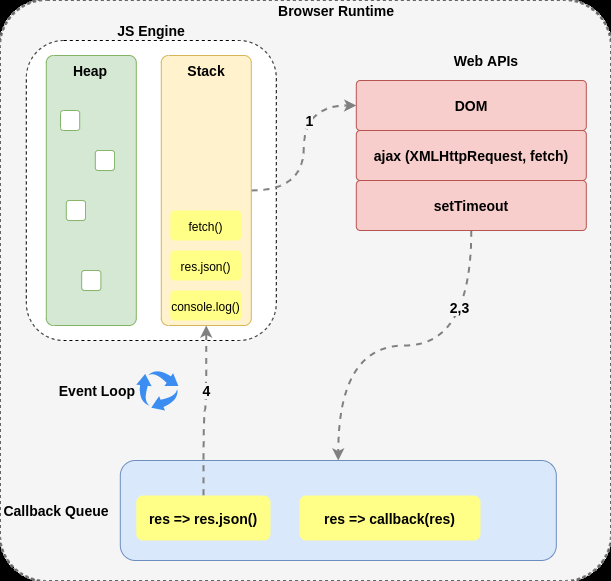
When an asynchronous callback is encountered in the JavaScript runtime stack, it is moved to the Web APIs, allowing the stack to keep executing other tasks without waiting for the callback to complete.
Once in the Web APIs, the asynchronous callback is placed in the callback queue (also known as the task queue). This queue holds all completed asynchronous operations.
The Role of the Event Loop
The event loop, a key component of the browser, constantly checks if the stack is empty. If the stack is indeed empty, the event loop retrieves the next callback from the callback queue and pushes it onto the stack for execution.
The primary job of the event loop is to continuously check for two conditions:
- Whether there are any tasks in the callback queue.
- Whether the stack is currently empty.
If both conditions are met, the event loop takes the next task from the callback queue and pushes it onto the stack for execution.
In Summary
The process goes like this: async callbacks from the runtime stack are moved to the Web APIs, then placed in the callback queue. The event loop continuously checks for an empty stack and, upon finding one, takes the next callback from the callback queue and pushes it onto the stack for execution. This cycle ensures that asynchronous callbacks are processed in a timely manner without disrupting the overall execution flow.
Let's illustrate this process with a simple example:
console.log('hi');

setTimeout(function () {
  console.log('there');
}, 5000);

console.log('deepak');
Output sequence:
hi
deepak
there   (after a 5-second delay)
Program explanation:
- The program starts executing.
console.log('hi')is pushed onto the stack.'hi'is printed to the console.setTimeoutis called. Its callback is handed off to the Web APIs to start a 5-second timer;setTimeoutitself returns immediately.console.log('deepak')is pushed onto the stack.'deepak'is printed to the console.- After the 5-second timer expires, the callback is placed in the callback queue.
- The event loop detects an empty stack and retrieves the callback.
- The callback is pushed onto the stack for execution, resulting in
'there'being printed to the console.
This sequence showcases how JavaScript handles asynchronous tasks via the event loop, ensuring smooth execution while dealing with timed functions like setTimeout.
Questions
1. What is the output of the following program?
console.log('1');

setTimeout(function () {
  console.log('2');
}, 5000);

console.log('3');
Answer:
1
3
2
Explanation: The program logs '1' and '3' immediately, while '2' is printed after a 5-second delay due to the asynchronous nature of setTimeout.
2. What is the output of the following program?
setTimeout(function () {
  console.log('hi');
}, 1000);

setTimeout(function () {
  console.log('there');
}, 2000);

setTimeout(function () {
  console.log('deepak');
}, 3000);
Expected output:
- After 1 second:
'hi'is printed. - After another 1 second (2 seconds total):
'there'is printed. - After another 1 second (3 seconds total):
'deepak'is printed.
Explanation:
- Each
setTimeoutschedules its callback to run after the specified delay, measured from the momentsetTimeoutitself is called — not from when the previous callback finished. - Because the three calls happen back-to-back at time
t ≈ 0, the callbacks fire att ≈ 1s,t ≈ 2s, andt ≈ 3srespectively. - So
'hi'is printed after 1 second,'there'after 2 seconds, and'deepak'after 3 seconds.
A common gotcha: if all three timers used the same
1000msdelay, all three callbacks would land in the queue at roughly the same moment and fire in registration order —hi,there,deepakall neart ≈ 1s, not staggered at 1s/2s/3s.